
The landscape of modern business requires teams to execute complex strategies with precision. According to the Project Management Institute (PMI), organizations waste approximately 12 percent of their investment in project spend due to poor performance and inefficient methodologies. Selecting the correct project management tool is critical to minimizing this waste and keeping your team aligned. A frequent dilemma for modern managers is determining exactly when you should use gantt vs kanban to maximize team efficiency.
Both methodologies have proven track records, yet they serve fundamentally different purposes in project planning and execution. This comprehensive guide will explore the unique strengths of each system, reference insights from industry leaders, and provide a definitive framework for making the right choice for your workflows.

Understanding the Basics: Gantt Charts and Kanban Boards
Before diving into the core comparison, we must establish clear definitions of these essential concepts. The foundation of any successful initiative relies on understanding the tools at your disposal.
What is a Gantt Chart?
Developed by Henry Gantt in the early 20th century, the gantt chart is a horizontal bar chart used to visualize project schedules. It provides a macro-level view of a project, detailing start and end dates, milestones, and task dependencies. A timeline in a Gantt Chart allows managers to forecast long-term resource allocation and track the progression of complex projects over months or years. The gantt view is exceptionally powerful for mapping out sequential phases where one task cannot begin until another finishes.
What is a Kanban Board?
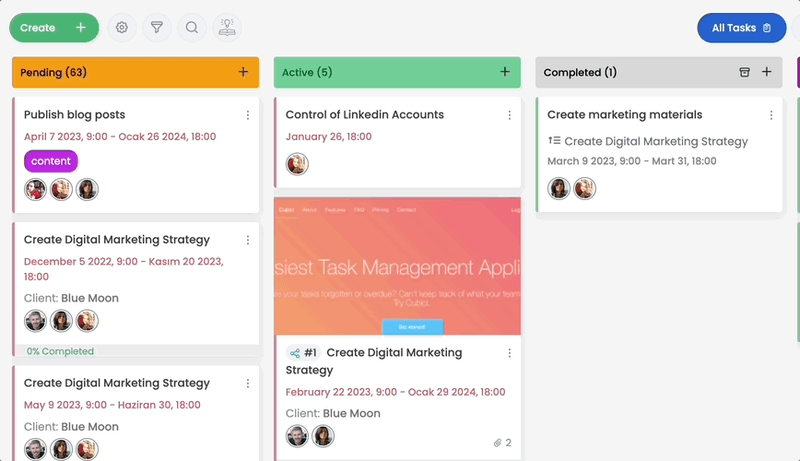
The kanban system originated from the Toyota Production System in the 1940s and was later adapted for knowledge work by thought leaders like David J. Anderson. A Kanban Board is a visual framework used to implement agile methodologies. It focuses on continuous delivery without overburdening the development team. Teams use kanban cards to represent individual tasks, moving them through kanban swimlanes that represent different stages of completion. This highly adaptable planning tool helps teams limit work in progress and identify any operational bottleneck in real time.
Use Gantt Charts for Master Project Planning
When dealing with a high number of tasks and intricate deliverables, project managers often lean toward traditional chronological mapping. You should use a gantt chart when your primary objective is to establish a rigorous, time-bound framework.
Gantt charts to map schedules are ideal for initiatives that require strict deadlines. For example, in construction or major software deployment, understanding the critical path is essential. If a prerequisite task is delayed, a gantt chart immediately visualizes how that delay impacts the final deadline. This visualization of dependency ensures that stakeholders are rarely caught off guard.
Furthermore, gantt charts are better suited for scenarios where multiple projects draw from the same resource pool. By observing overlapping timelines, managers can prevent team burnout. Real-world experiences from enterprise project managers frequently highlight that without a gantt chart and kanban system working in tandem, long-term strategic alignment is nearly impossible.

Use a Kanban Board for Agile Workflow and Daily Execution
Conversely, knowledge work often requires a more fluid approach. You should use kanban when your team faces shifting priorities and an ongoing influx of tasks.
Using kanban boards allows teams to plan with immediate flexibility. The core philosophy of the kanban method involves limiting work in progress (often referred to as work-in-progress limits or w-i-p limits). As David J. Anderson outlines in his foundational texts on the subject, limiting work-in-progress forces teams to finish existing tasks before starting new ones. This practice dramatically increases throughput.
Kanban helps teams maintain a steady pace of daily execution. Tasks on a kanban board are immediately visible to everyone, creating an environment of transparency. Whether you are using a physical task board or digital project management software, the kanban workflow excels at highlighting where tasks accumulate, allowing managers to allocate additional resources to clear the backlog.
Evaluating When You Should Use Gantt vs Kanban
The question of when you should use gantt vs kanban often arises during the initial scoping phase of an initiative. To fully grasp when you should use gantt vs kanban, we must examine the specific parameters of your deliverables and how your team operates on a day-to-day basis.
If your work is highly structured, predictable, and bound by strict start and end dates, the scale tips toward gantt. However, if your work is continuous, heavily dependent on rapid iterations, and requires agile responsiveness, kanban focuses on precisely those strengths.
To make this decision clearer, below is a side-by-side comparison of gantt vs kanban boards highlighting their primary differences:
| Features | Gantt Chart | Kanban Board |
|---|---|---|
| Primary Focus | Project planning and timeline visualization | Daily execution and continuous workflow |
| Visual Structure | Horizontal bar chart | Vertical columns and kanban cards |
| Handling Changes | Rigid; changes require adjusting the entire timeline | Highly flexible; new tasks easily enter the backlog |
| Task Dependencies | Explicitly linked and visualized | Not inherently linked; relies on team communication |
| Work Limits | Based on scheduled time allocations | Enforced through work-in-progress limits |
| Best Suited For | Complex projects with definitive deadlines | Agile teams managing ongoing, variable requests |
Key Indicators for When You Should Use Gantt vs Kanban
Ultimately, knowing when you should use gantt vs kanban comes down to your organization's operational maturity and specific use cases. Let us look at a few practical scenarios.
Scenario A: The Event Launch
Imagine your company is hosting a major industry conference. You have to secure a venue, print marketing materials, align guest speakers, and launch a digital campaign. The printing cannot happen until the designs are approved. In this scenario, you face rigid task dependencies. A kanban board vs a timeline approach would fall short here. You need the timeline view. Choosing vs gantt chart methodologies in this instance would be a mistake.
Scenario B: The Customer Support Team
Consider a customer support team resolving incoming software issues. Tickets arrive unpredictably. There are no linear project phases, only the continuous resolution of distinct problems. Here, kanban boards are better. A kanban view allows representatives to pull tasks from a backlog and move them to resolution. Attempting to schedule unpredictable tickets on a timeline would create unnecessary administrative overhead.
Combine Kanban and Gantt Charts for Hybrid Project Management
The modern workplace rarely fits perfectly into one rigid methodology. In many cases, it is not a matter of kanban vs gantt, but rather how to use both together. According to recent surveys by Agile Alliance, many organizations are adopting hybrid project management approaches to leverage the best of both worlds.
You can combine kanban and gantt charts effectively by designating gantt for planning and kanban for execution. Leadership teams can map out the macro-level milestones, budget cycles, and strategic objectives on a timeline. Once those phases are established, the specific daily tasks required to reach those milestones can be extracted and managed by individual contributors on a board.
This approach, sometimes referred to as agile gantt, ensures that executives have the high-level oversight they require, while frontline employees enjoy the flexible, uncluttered interface of a visual task board. The combination of kanban and gantt provides a dual perspective that single-methodology popular project management tools often fail to deliver.
Why Choose One? Use Both Together with Cubicl
The debate of gantt chart vs kanban does not have to end with a compromise. If your team handles multiple projects of varying complexities, forcing a single view upon everyone will only create friction. This is why forward-thinking companies rely on project management software that adapts to their specific operational reality.
Cubicl is a cloud-based SaaS designed to solve this exact problem. As a highly customizable work management tool, Cubicl empowers teams to visualize their workflows exactly as they need them. Rather than toggling between a fragmented tech stack, your team can seamlessly switch between kanban boards and gantt charts within the same unified platform.

Unlike heavy ERP systems or production tracking software that bloat your interface with unnecessary modules, Cubicl focuses purely on optimizing your work management. You can map out your entire quarter on a gantt chart and a kanban board can simultaneously be used by your marketing or development teams to execute those daily tasks.
When comparing a standalone board vs an integrated system like Cubicl, the benefits are clear. You eliminate the data silos that occur when leadership uses one planning tool and the execution team uses another like Jira or physical boards. With Cubicl, every milestone, dependency, and kanban card is synced in real time.
Making the Right Choice for Your Team
The strategies discussed above highlight that methodologies like gantt and kanban are not mutually exclusive. They are distinct lenses through which you can view your operational health.
To summarize the core debate:
- Use gantt charts when your priority is long-term planning, forecasting, and managing a timeline with strict dependencies.
- Use a kanban board when your priority is minimizing bottlenecks, controlling work in progress, and empowering an agile team with continuous delivery.
- Combine kanban and gantt when your organization requires both high-level strategic alignment and flexible, tactical execution.
Project management is inherently complex, but the tools you use to manage it should not be. By understanding the distinct advantages of these systems, you can confidently architect a workflow that drives results. Hopefully, this guide has fully clarified when you should use gantt vs kanban for your upcoming initiatives. By leveraging a versatile, cloud-based platform like Cubicl Project Management Software, you can transcend the limitations of traditional software and provide your team with the exact visualization they need to succeed.