
Running a media agency means keeping a lot of moving parts in order. You're managing clients, deadlines, creative teams, and campaigns. Often all at once. Having the right project management software for agencies makes a real difference in how smoothly that all runs.
In this post, we'll walk through how Cubicl works as a flexible agency project management software. It wasn't built exclusively for agencies, but it adapts well to how agencies actually operate from client and resource management to workflow automation, app integrations, and team collaboration.

Agency Management with Cubicl Project Management Software
Cubicl is a cloud-based work management and task management platform. It's customizable, practical, and works for teams of different sizes and structures. If you're looking for project management tools for marketing that can fit your existing processes rather than the other way around, Cubicl is worth a close look.
Here's a quick overview of what it covers:
- Work Anywhere: Cubicl has web and mobile apps, so your team can manage project work from the office, at home, or on the go.
- Built-in Communication: Instead of chasing conversations across email threads, your team can use Cubicl's messaging feature for both direct and group chats, keeping internal communication in one place.
- Custom Workspaces: Each workspace comes with its own Tasks, Files, Calendar, Gantt Chart, Timesheet, and Reports sections. You decide how to structure them by client, department, or project type.
- Reporting and Tracking: Cubicl gives you a centralized dashboard to monitor project progress, time tracking, and team productivity through detailed reports.
- Flexible Task Management: Assign tasks to multiple team members, set up recurring tasks, attach creative assets, and break work into subtasks when a project needs more detail.
- Client Management: Store client information, turn incoming emails into tasks, manage support tickets through the client portal, and assign account managers per client.
- Branded Client Portal: Offer clients a custom-branded portal: a clean, professional way to keep them in the loop without extra back-and-forth.
Customize Cubicl as Your Creative Agency's Project Management Tool
Now that the basics are covered, let's get into how you can shape Cubicl Work OS to fit the way your agency works. One reason it holds up well as a project management platform for creative teams is that it doesn't impose a rigid structure. You can adapt it to your team's language and existing processes which matters a lot in day-to-day use.
End-to-End Team and Unit Tracking for Agencies
Agencies deal with multiple clients, teams, and campaigns running in parallel. Without a clear structure, project tracking across all of that gets messy quickly.
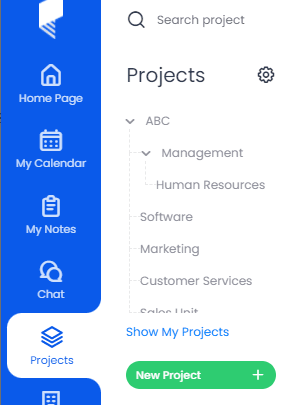
Cubicl's workspace model helps here. Creating separate workspaces for each client or project means tasks, due dates, and deliverables stay contained and easy to find. Project workflows don't bleed into each other, and nothing gets lost in a shared, cluttered board.
Shape Cubicl Work Management Tool Around Your Agency's Structure
Cubicl's work management structure lets you group tasks by team, department, or client. It's a straightforward way to reflect how your agency is actually organized.
Some common ways agencies set this up:
- Departments: Creative Team, Marketing, Strategy, Software Development, Client Relations
- Teams: Graphic Design, Copywriting, Social Media, SEO, Web Development
- Client Projects: Separate spaces for each client's branding, campaigns, and content work
- Campaigns: Dedicated spaces for specific initiatives like re-marketing, campaign planning, or ad launches
This kind of structure makes project planning cleaner, keeps collaboration focused, and makes it easier to see where things stand across the board.
Customizable Task Management for Marketing Agencies
Cubicl's task management is where a lot of the day-to-day project management happens. Even though it isn't purpose-built as project management software for agencies, the flexibility is there to make it work that way.
The Kanban view shows tasks moving through stages. The defaults are Pending, Active, Completed, and Suspended but you can rename them to match your agency's process. A marketing team running campaigns might prefer stages like Content Creation, Approval Process, Campaign Launch, and Post-Launch Review.
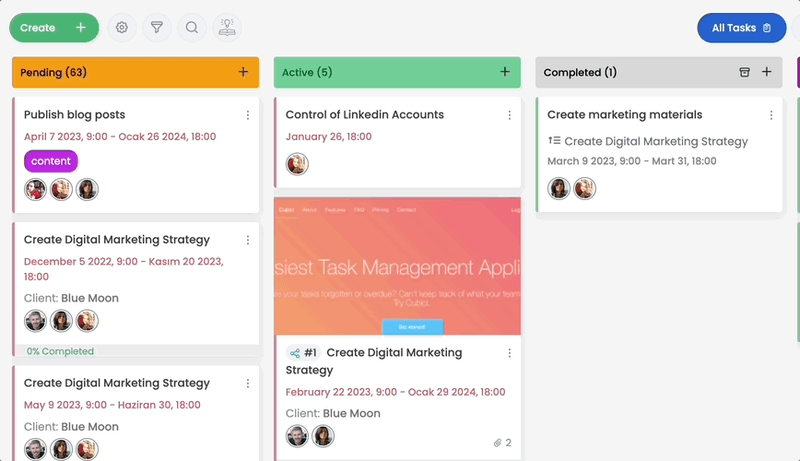
Beyond stages, every task card supports Custom Fields. Standard fields cover the basics are title, description, assignee, files. But you can add fields like Budget Allocation, Campaign Channels, Client Feedback, or performance targets to make sure all the relevant information is attached to the task itself, not buried in an email chain.
This is one of the essential features to look for when you choose a project management tool for an agency: the ability to reflect your actual process, not a generic one.
The result is that marketing agencies can keep visibility into project status clear, manage client projects more consistently, and reduce the friction that comes from jumping between tools. Whether you're handling digital marketing campaigns, content calendar planning, or social media schedules, the structure adapts to the work.
CRM and Process Management: Managing Clients in Cubicl
Strong client communication and organized project management go hand in hand for any agency. Cubicl brings both into the same platform, which cuts down on the coordination overhead that usually builds up when these things live in separate tools.
Clients in Cubicl Project Management Software for Agencies
Here's how this works in practice. Say you're at a digital marketing agency, and BrightTech Solutions is one of your clients. You handle their social media campaigns, content calendar, and SEO services. With Cubicl, all of that can live in one place.
1. Create a Client Profile
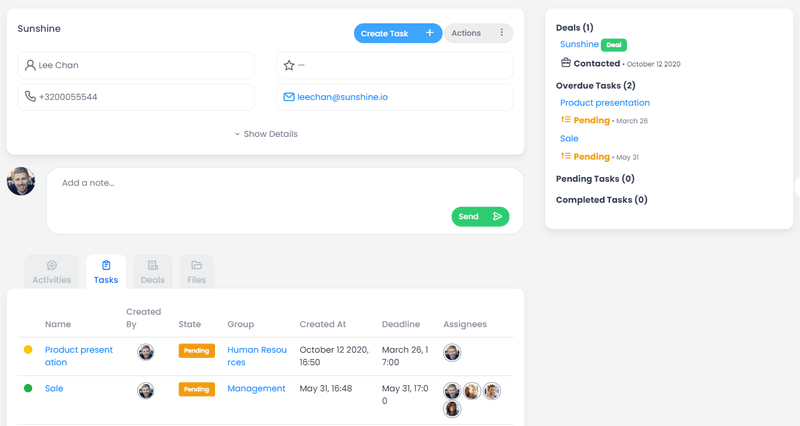
- Go to the Clients tab and add BrightTech Solutions
- Add their contact details, project goals, and any specific requirements
- Assign an account manager for consistent project tracking and ownership
2. Link Projects to the Client
- In project settings, connect BrightTech Solutions under Project Details
- From that point, tasks created in that project are associated with the client automatically
- You control what the client sees, nothing is shared by default
3. Schedule Tasks and Track Work
Say you're running a monthly social media campaign for them. You can create a recurring task that resets each month, set key milestones like ad copy approval and campaign launch, and let the Kanban board surface it automatically. The marketing team always knows what's coming up, and time tracking data stays attached to the right client.
4. Share Updates with the Client
When you hit a milestone worth sharing, you can send a client portal invite directly from the task. Once the client registers, they see only what you've granted access to. They can comment, approve content, or flag revisions, all within Cubicl, without needing a separate communication thread.
Keeping Communication Organized in Project Management Software for Agencies
Every interaction like deadline changes, revision requests, approvals, gets recorded in one place. This kind of transparency helps avoid the misunderstandings that tend to build up when communication is scattered across email, Slack, and spreadsheets. It also makes project updates easier to compile when clients ask where things stand.
Advanced Features: The Client Portal
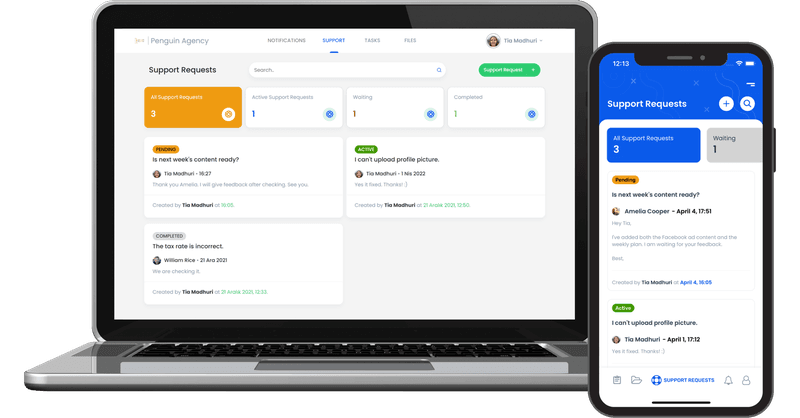
The Client Portal is one of the more practical features Cubicl offers for agencies. It gives clients a dedicated space to access what's relevant to them, without exposing your entire project setup.
What Clients Can Access
- Notifications: Current status on campaigns, projects, or ongoing creative work
- Support Tickets: A way for clients to submit questions or requests without going through email
- Task Updates: Progress on shared tasks, so clients can see what's been completed
- Files: Reports, drafts, visuals, and other creative assets shared securely in one place
- Campaign Metrics: Performance data like traffic, conversion rates, or social media results
Having this in one portal reduces back-and-forth and gives clients a clearer picture of project health without requiring extra reporting work from your team.
Handling Client Requests
When BrightTech Solutions has a question about a running campaign, they can open a support ticket directly in the portal instead of sending an email. That ticket comes into Cubicl, gets assigned to the right team member, and moves through a resolution process, all tracked and visible. Once resolved, the client gets notified. Nothing falls through the cracks, and the full history of the request is there if needed.
Managing Potential Client Inquiries
The Client Portal also works for prospective clients. If GreenTech Digital reaches out about your SEO services, you can embed a request form on your website that feeds directly into Cubicl as a task. Requests get categorized, assigned, and followed up on systematically which means fewer missed leads and more consistent project setup from the start.
Client Work in Project Management Software for Agencies
Bringing client interactions like active projects, support tickets, new inquiries, deliverables, into one project management platform reduces the overhead of managing it all separately. It's a more organized way to work, and it's easier to maintain a consistent standard of service when everything is in the same place.
Integrate Your Favorite Apps and Automate Your Workflows
Most agencies already have a stack of tools they rely on. Mailchimp or Sendinblue for email, Hootsuite or Buffer for social, Google Analytics or HubSpot for performance tracking. Getting those tools to talk to your project management software for agencies is where things often break down.
Cubicl addresses this through Monkedo, its connected automation and integration platform. If you need to connect external tools to Cubicl or build automated workflow management between apps, Monkedo is where that happens.
No-Code Automation with Monkedo
Monkedo is a no-code automation platform with a drag-and-drop interface. You can build integrations and automate repetitive processes without writing any code. It connects with over 400 applications.
For Cubicl users, Monkedo credits are included in your subscription and reset monthly. You can use them to build integrations, reduce manual work, and keep your project workflows moving without the usual friction between tools.
Monkedo Credits by Plan:
| Plan | Credits |
|---|---|
| Starter Plan | 100 Credits / Month / User |
| Professional Plan | 200 Credits / Month / User |
| Enterprise Plan | 300 Credits / Month / User |
It's a practical way to connect the tools your marketing team already uses and reduce the manual work that builds up when data lives in too many places.
Why Cubicl Works as Project Management Software for Agencies in 2026
When professional services evaluate PM Tools for 2026, a few things tend to matter most: flexibility, client communication, the ability to centralize work across teams, and enough AI-powered automation to reduce repetitive tasks. Cubicl covers all of those without the overhead of a platform built for enterprise teams or the limitations of something too simple to scale.
It's not generic project management software that you have to wrestle into an agency shape. The structure (workspaces, Kanban stages, custom fields, client profiles, and the portal) maps reasonably well onto how agencies and creative teams actually work.
Whether you're a small marketing agency managing a handful of clients or a growing studio with multiple departments, the project management capabilities in Cubicl are adaptable enough to grow with you. And if you're currently managing client projects across multiple disconnected tools, consolidating onto one agency project management software tends to save more time than it takes to set up.
Agency Project Management Software for You
If you want to explore the features or have feedback to share, you can reach the team at support@cubicl.io.
If you haven't tried it yet, the 14-day free trial is a good place to start. No commitment, and enough time to get a clear sense of how it fits your agency's project management needs.