
The modern business environment demands efficiency, transparency, and a professional digital presence. Relying solely on emails or phone calls to manage client interactions is no longer sufficient for growing organizations. Instead, forward-thinking companies are turning to dedicated platforms to streamline communication and task sharing. If you want to maintain a competitive edge and build stronger client relationships, it is highly recommended to create a client portal with your brand.
By implementing a tailored portal solution, you provide a centralized, secure location for clients to access files, submit requests, and track project progress. This article explores the core components of effective portal software, the importance of brand consistency, and how you can leverage Cubicl as your primary work management software to build a seamless customer portal.

What Is a Client Portal Software Solution?
A client portal is a secure, web-based interface that allows organizations to share information, collaborate on projects, and provide customer support in a centralized digital environment. According to a recent Zendesk Customer Experience Trends Report, nearly 70 percent of customers prefer to use self-service channels to resolve basic issues before contacting a support agent. A customer portal software system facilitates this exact preference by acting as an extension of your internal team.
When evaluating the best client portal for your business, it is vital to understand the difference between standard communication methods and a dedicated portal experience. The table below outlines these distinctions:
| Feature | Traditional Communication (Email/Phone) | Dedicated Client Portal Software |
|---|---|---|
| Information Organization | Scattered across multiple inboxes and threads | Centralized within a specific project management framework |
| Client Experience | Often delayed due to manual routing | Immediate access to a self-service portal |
| Brand Consistency | Limited to email signatures and standard attachments | Fully branded client portal with logo and brand colors |
| Task Tracking | Requires manual updates and follow-ups | Real-time dashboard updates for ongoing client tasks |
| Secure Login | Basic email authentication | Secure client portal with proper authentication measures |
A user-friendly portal not only organizes client data but also significantly enhances the client experience by removing friction from everyday interactions.
Why You Should Create a Client Portal With Your Brand
Providing a portal software tool is a great first step, but customization is what transforms a standard tool into an exceptional client experience. A study by McKinsey & Company indicates that consistent brand presentation across all customer touchpoints can increase revenue by up to 23 percent. Therefore, when you create a client portal with your brand, you establish a sense of trust and professionalism that off-the-shelf software cannot match.
Customer success experts consistently highlight that onboarding and ongoing client interactions set the tone for long-term retention. If your clients log into a generic platform that lacks your logo and brand colors, the cognitive disconnect can reduce portal adoption. However, a customized client interface reassures them that they are interacting directly with your business. Custom portals ensure that your brand remains front and center, from the initial client onboarding phase to daily support requests.
Cubicl is a comprehensive work management software designed specifically to help you build a portal that aligns perfectly with your specific client needs.
Two Paths to Client Interactions: Support Forms and Portal Links
Cubicl provides two primary methods for managing client communication, ensuring that you can accommodate both quick inquiries and long-term project management.
The Support Form Link
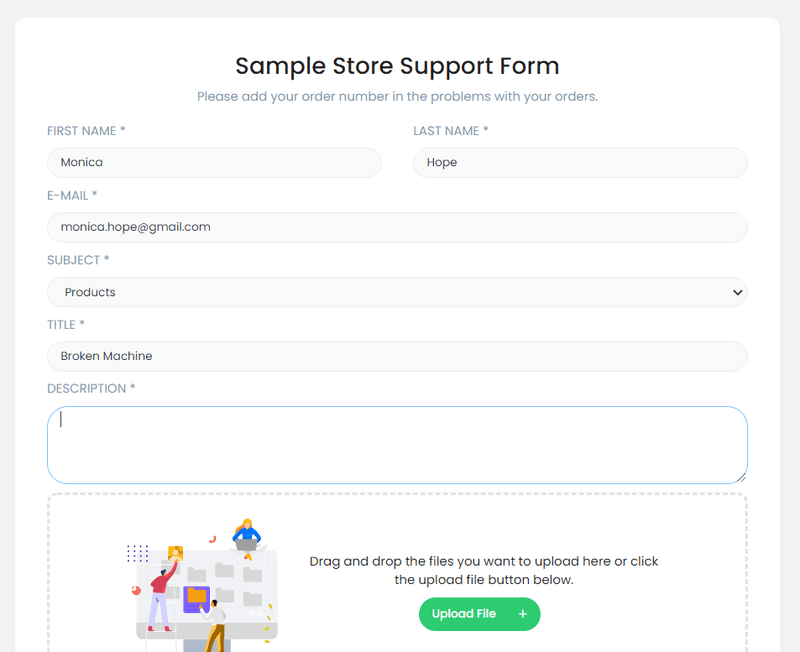
The Support Form Link is a public-facing URL that directs clients to a dedicated support form. This method is ideal for quick complaints, problems, or suggestions. By filling out this form, clients can submit a request without needing a secure login or an active account. They simply provide their name, email, subject, description, and any relevant files.
Consequently, this support request immediately populates as a task within the relevant project in Cubicl. The system adds a unique ID number to the task, and the assigned team members receive an instant notification. From there, your internal team can write a reply directly within the work management software. The client receives an email containing a link to view the response and reply back seamlessly. This workflow ensures that no request is forgotten, and your team does not experience constant interruptions from unrecorded phone calls.
The Dedicated Portal Link
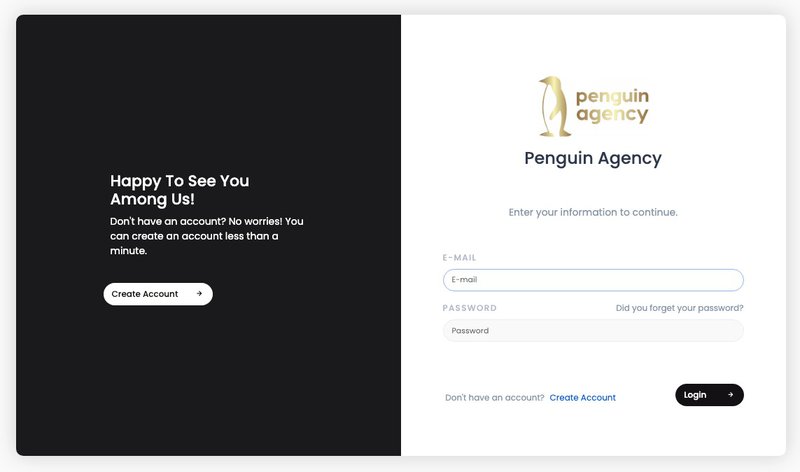
For more complex client relationships, the Portal Link is the optimal choice. This link allows clients to create a user account on your customer portal, enabling a comprehensive portal experience. Once registered, clients gain access to a tailored dashboard where they can view tasks, shared files, and ongoing communications.
This client dashboard provides real-time visibility into the status of shared tasks. Clients can follow or unfollow specific tasks, ensuring they receive the exact level of notification they desire. Because all activities within the portal generate notifications within your main Cubicl account, your team can respond quickly, manage deadlines effectively, and foster a highly transparent relationship.
Streamlining Workflow and Managing Support Requests
A primary benefit of implementing a portal solution is the ability to automate and organize incoming work. Cubicl Work Management Software allows you to define specific portal features to match your workflow.
Enabling the Portal and Setting Permissions
Portal building in Cubicl starts with defining access levels. You have strict control over what your clients can do within the portal. You can set the portal status to:
- Active: Allows clients to actively submit new support requests and interact with tasks.
- Read-Only: Permits users to view their existing requests and shared tasks without the ability to create new ones.
- Inactive: Completely blocks portal access for times when the portal is not needed.
Organizing Support Topics and Forms
To efficiently manage support requests, you need to route them to the right people. Cubicl allows you to create specific "Support Topics." For example, a marketing agency might have one topic for "Design Revisions" and another for "Campaign Analytics."
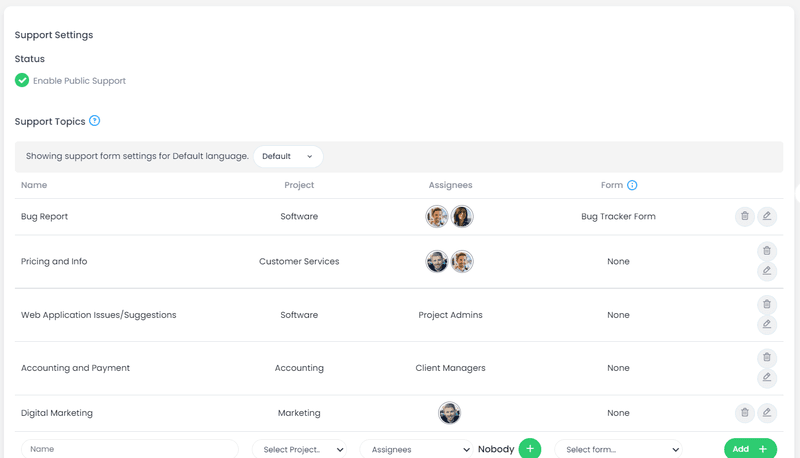
For each topic, you can configure precise project management software:
- Assignees: Direct team members responsible for handling the specific request type.
- Project Admins: Managers of the selected project who oversee the broader workflow.
- Client Managers: Specific personnel assigned to nurture the relationship with particular clients.
Furthermore, you can attach custom forms to these support topics. If a client selects a specific topic, they will be prompted to answer pre-defined questions. This ensures your team gathers all necessary information upfront, minimizing back-and-forth communication and streamlining the entire workflow.
How to Create a Client Portal With Your Brand Using Cubicl
The technical process of customization is straightforward. To create a client portal with your brand, you will utilize Cubicl’s comprehensive customization settings.
Implementing a Custom Domain
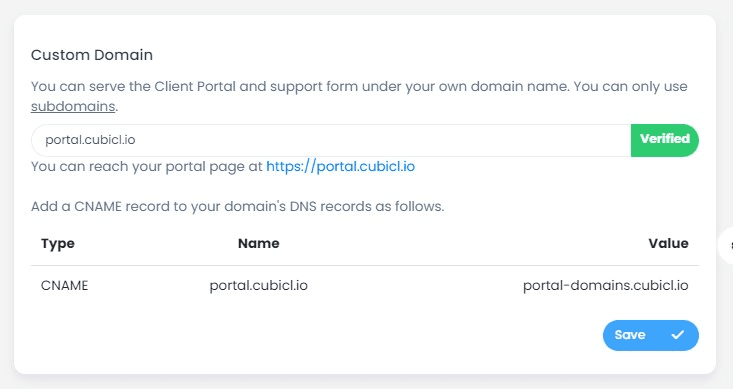
To achieve true brand consistency, your portal should not look like a third-party application. Custom domains allow you to serve your client portal under your own web address, utilizing a subdomain (for example, portal.yourcompany.com).
Setting this up requires creating a new DNS record in your domain management panel. Specifically, you will add a CNAME record pointing to Cubicl's servers. Once verified, your portal links will automatically update to reflect your custom domain. This level of customization is a hallmark of the best client portal platforms, as it solidifies trust during authentication and secure login processes.
Visual Customization Settings
Beyond the URL, the visual elements must match your brand identity. Within Cubicl’s Customization Settings, you have complete control over the aesthetics of both the login page and the register page.
- Favicon and Page Title: You can upload your own favicon (the small icon displayed in the browser tab) and set a custom Page Title. This small detail significantly enhances the professional look of the portal software.
- Background and Interface: The customization interface allows you to modify the background, left panel, buttons, and fonts. You can seamlessly integrate your brand colors to ensure the environment feels familiar to your clients.
- Page Links: You can add specific URLs to the bottom of the login and register pages. This is an excellent place to link back to your main website, your terms of service, or your own knowledge base.
- Language Support: If you serve an international audience, you can configure the portal to support different languages. Clients will automatically see the interface in their preferred language, demonstrating a high level of personalized customer success.
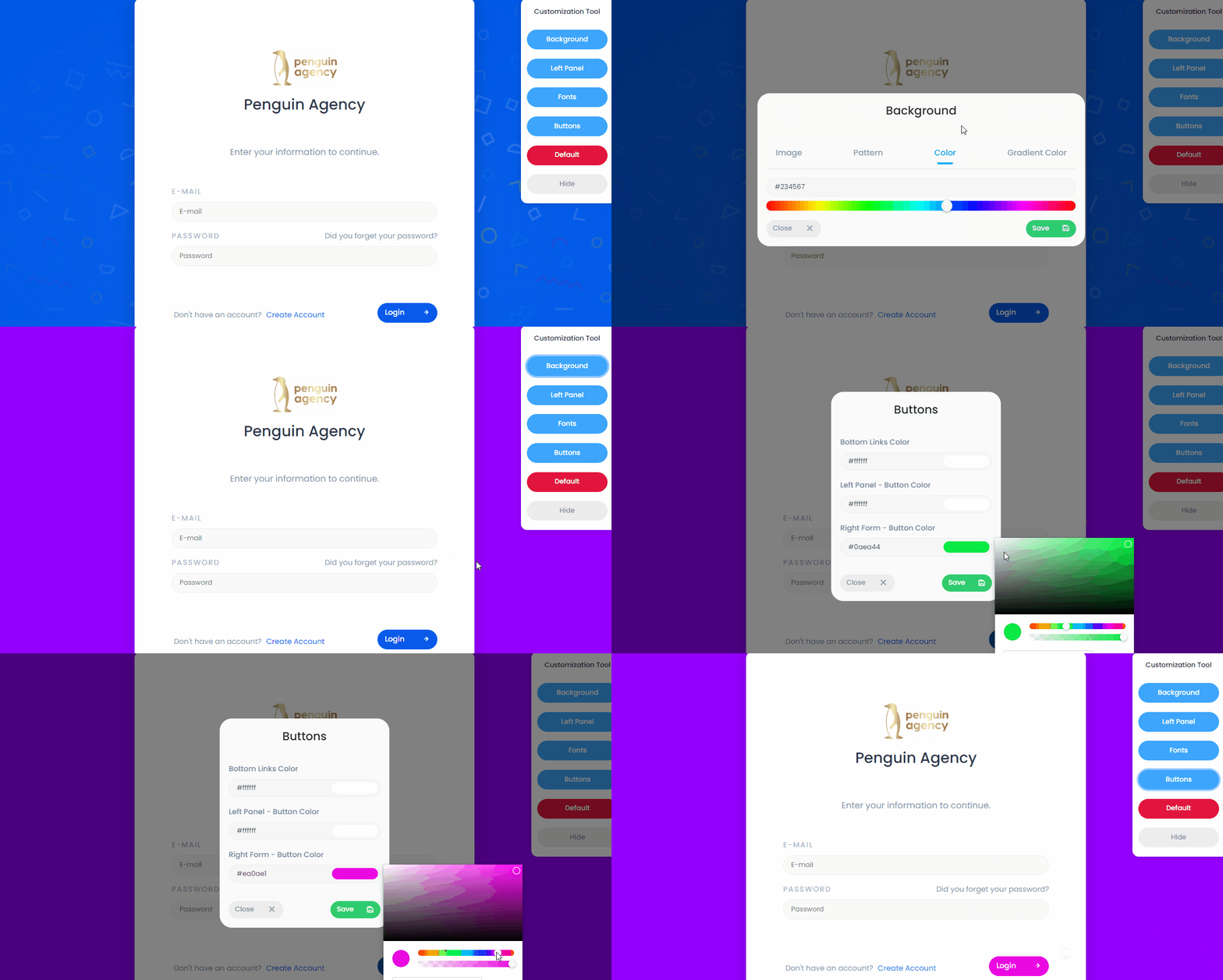
When you carefully configure these visual and functional elements, you create a client portal with your brand that feels like a natural extension of your core business operations.
Customer Portal Software FAQs
To better understand how portal building can impact your organization, review these frequently asked questions regarding client portal software.
What makes a branded client portal important?
A branded portal reinforces your professional image. By using a custom domain, logo, and brand colors, you create a cohesive environment that increases client trust and boosts overall portal adoption rates.
How does a client portal improve project management?
Instead of relying on scattered email threads, a portal centralizes all communication. Clients can view task statuses, upload required files, and leave comments directly on the relevant project tasks. This integration of project management tools ensures everyone is aligned and deadlines are met.
Can clients use the portal without creating an account?
Yes. With Cubicl, you can share a public Support Form Link. This allows clients to submit requests and receive email updates without needing to authenticate or manage a separate login. However, for a full dashboard experience, creating an account via the Portal Link is necessary to share tasks, bookkeeping records and files with clients.
Is it difficult to customize the portal interface?
Not at all. The customization settings in Cubicl provide a visual interface to adjust backgrounds, buttons, and fonts. Adding a custom domain simply requires a basic CNAME record update with your domain provider.
How do internal teams manage notifications from the portal?
Whenever a client submits a request or updates a task within the portal, notifications are automatically routed to the designated Assignees, Project Admins, or Client Managers in your main Cubicl workspace.
Create A Client Portal With Your Brand Now!
Transitioning away from chaotic email chains and undocumented phone calls is a crucial step for business growth. By adopting a dedicated customer portal software solution, you streamline your operations, secure client data, and drastically improve client satisfaction.
The aesthetic and functional presentation of this tool matters immensely. When you take the time to create a client portal with your brand, you signal to your clients that their experience is your top priority. Cubicl provides the robust work management features required to organize your internal team, alongside the customization tools needed to deliver a truly exceptional client experience. Evaluate your current communication workflows, explore the benefits of a self-service portal, and start building stronger client relationships through a branded portal solution today.