
In the modern workplace, the ability to quickly find and utilize information can make or break a project's success. As your company grows, critical data often becomes scattered across email threads, local hard drives, and fragmented chat applications. This fragmentation inevitably leads to lost productivity, frustrated employees, and inconsistent customer support. The solution to this common corporate bottleneck lies in establishing a robust centralized hub for your team's information. While many platforms exist solely for documentation, integrating your company's knowledge directly into your daily workflow offers a significant competitive advantage. This is where Cubicl truly shines. Although primarily recognized as a comprehensive work OS and task management tool, Cubicl can be customized to serve as a highly effective team knowledge base. By leveraging its flexible project structures, you can centralize important information without the need to purchase, implement, and learn entirely new knowledge management software.

Why Knowledge is Important in the Modern Workplace
The cost of ignoring knowledge base systems is staggering. According to a widely cited report by McKinsey & Company, the average employee spends nearly 20 percent of their workweek searching for internal information or tracking down colleagues who can help with specific tasks. That equates to roughly one full day of lost productivity every single week. Furthermore, a study by Panopto on workplace productivity reveals that 68 percent of employees believe that information silos within their organization negatively impact their daily performance.
As renowned management consultant Peter Drucker famously noted, "Knowledge has to be improved, challenged, and increased constantly, or it vanishes." This principle highlights exactly why organizations must prioritize systems where multiple team members can easily update and share information across the company.
Choosing the Right Team Knowledge Base Software
When selecting a knowledge base solution, businesses often face a dilemma. They must decide between purchasing a dedicated, standalone knowledge management software or utilizing existing tools. A traditional knowledge base might offer extensive formatting options, but it often forces employees to switch between applications constantly. This context switching disrupts focus and reduces the likelihood that the team will actually use the platform.
Therefore, the best practice is to integrate your documentation and knowledge directly where your teams work.
What is Cubicl Task Management Tool?
Cubicl is a comprehensive work OS designed to streamline workflows, manage client relationships (CRM), and enhance overall productivity. It offers a unified platform for managing tasks, project management, team communication, document collaboration, and client interactions. The tool's integrated features eliminate the need for multiple applications, simplifying project oversight and improving efficiency.
Discover Cubicl's some features:
Building Your Team Knowledge Base with Cubicl
Let us explore how to create a culture of knowledge sharing by setting up your infrastructure in Cubicl. By carefully customizing its functionalities, you can effectively transform a standard project board into a living, breathing database.
Projects as Workspaces
Projects in Cubicl act as designated workspaces. They can be created for specific client deliverables, or in this case, internal repositories. You can create a master project simply titled "Organization Knowledge Base" where information relevant to the entire organization is stored.
Additionally, you can create sub-projects to organize information specific to different teams. For instance, the marketing department can have its own space, entirely separate from the IT department's documentation.

Customize Project Structure in Team Knowledge Base
Let us say you have created a project for the sales team to house their institutional knowledge. When you enter a standard project, you will see several tabs: Tasks, Files, Gantt Chart, Timeline Chart, Calendar, Reports, and Settings.

However, for a repository, you do not need all of these. To simplify the user experience, navigate to Settings, then Details, and finally Project Pages. Select only the "Tasks" and "Files" pages. This configuration streamlines the interface, ensuring that team members can find information without visual clutter.

Customize Task States for Effective Knowledge
In Cubicl, standard tasks are organized under the default Kanban statuses of Pending, Active, Completed, and Suspended. While excellent for project management, these labels are not ideal for categorized information.

Fortunately, you can customize these states. For an organization-wide database, you might create custom states such as:
- Company Information
- Strategy and Goals
- How We Work
- Company Policies
Meanwhile, a marketing team might prefer categories like Brand Guidelines, SEO Strategies, Social Media Assets, and Influencer Contacts.
It is important to maintain a "Pending" or "Draft" column. When an employee drafts new content to your knowledge base, it can sit in the "Pending" column until a manager reviews it. Once approved, the card can be dragged into its permanent category.
Managing Permissions for Different Roles and Teams
Not all employees need access to all company data. To protect sensitive information, you must manage permissions carefully. In Cubicl, there is a clear distinction between project managers and project members. Managers have full administrative authority. Members, however, can be assigned specific permission levels.
For example, you might grant senior leaders the ability to edit and delete team knowledge base articles, while junior staff members are granted view-only access. This ensures your single source of truth remains accurate and safe from accidental deletion.

Create Tasks as Team Knowledge Base Articles
To add important knowledge to your system, simply click the "Create+" button to generate a new task card. In this context, the task card serves as your knowledge article. You can enter a clear title, write a detailed description, and attach relevant files. Since this card is meant for reference rather than action, you can leave the start and end dates blank.
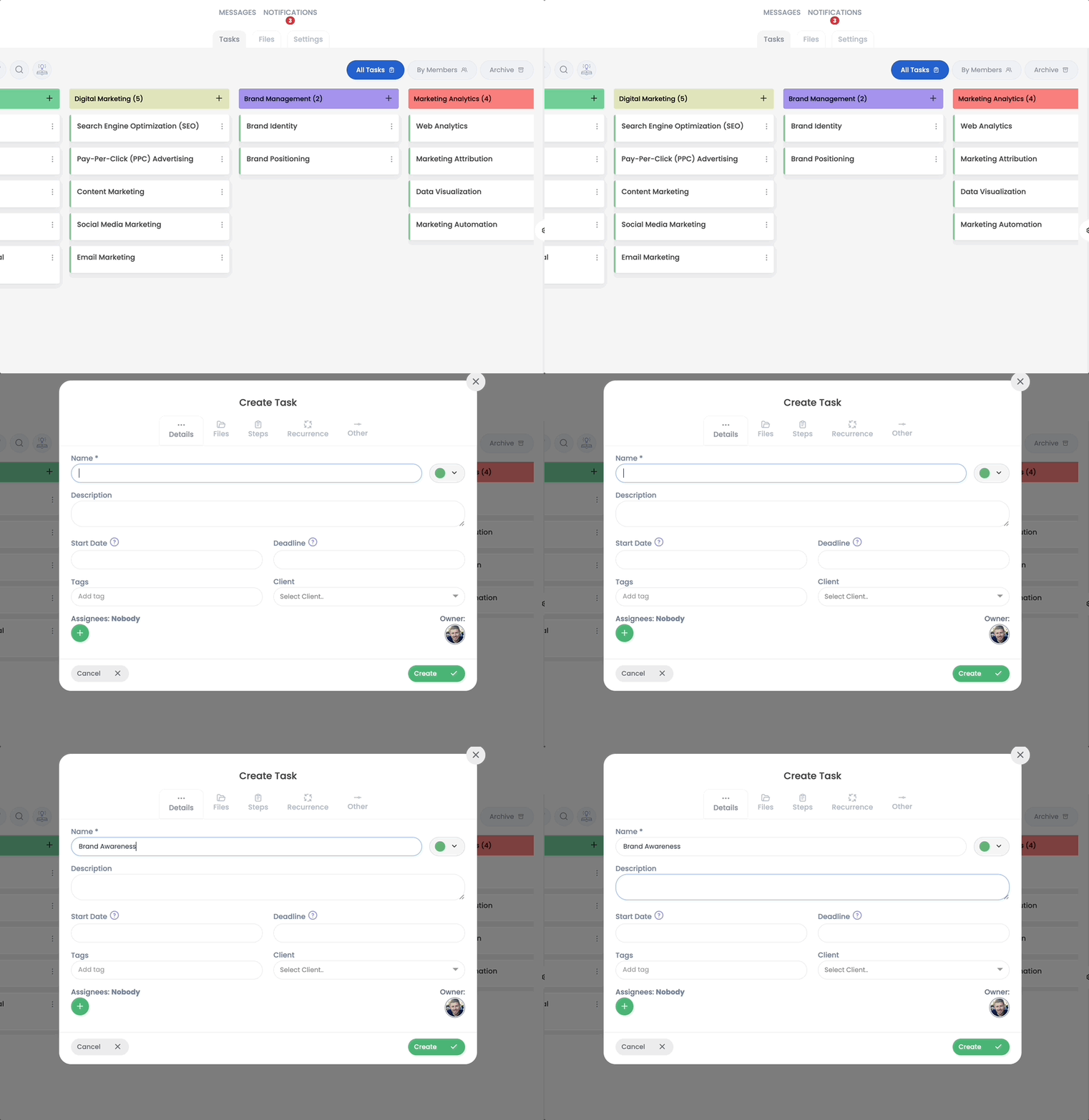
If you have the necessary permissions, you can view and edit the card later. Cubicl maintains an activity record under each task, providing an audit trail of who updated your knowledge base and when.
Document Management
There are two primary ways to store files in this system:
- Project Files Page: Upload broad, overarching documents here (such as a generic employee handbook or company logo packs).
- Task Attachments: Attach specific, niche documents directly to their corresponding task cards (such as a specific contract template attached to a "Sales Contracts" card).

Powerful Search: App-Wide and Project-Based
When employees need to retrieve this data, they rely on the system's search functionalities. Cubicl Work OS offers an App-Wide Search to look across the entire platform, scanning task titles, descriptions, and comments. Alternatively, users can perform a Project Search to find keywords specifically within the current repository. This powerful search ensures everyone is on the same page and can access the information they need instantly.

Archieve Knowledge Base Cards
Information needs evolve over time. As methods and techniques change, you can archive outdated task cards and replace them with updated versions. Archiving ensures you retain a historical record of past processes without cluttering your workspace, which is much better than deleting the information and losing it forever.
Utilizing a Template for Workflow Productivity
One of the most powerful strategies to enhance productivity is turning repeatable processes into actionable templates. By creating tasks with predefined sub-steps, your team knowledge base becomes an interactive guide.
Employee Onboarding
When new hires join the company, they require immediate access to the information. You can create a master task called "Employee Onboarding Checklist". In the description, welcome the new team member and provide links to important company policies. The sub-tasks can serve as their first-week itinerary:
- Read the company vision statement
- Log into the CRM system
- Review communication guidelines
- Schedule introduction meetings with department heads
As the employee completes each sub-step, they mark it off, ensuring a smooth and standardized onboarding experience.

Sales Lead Follow-Up Process
Your sales team relies heavily on CRM data and consistent communication. Create a template outlining the standard outreach process. Tasks might include:
- Review lead details in the CRM
- Send the initial contact email template
- Conduct a discovery call using the approved script
- Schedule a product demo
- Log all interaction notes
This guarantees that every prospect receives the same high-quality experience, regardless of which sales representative handles the account.
Event Planning Checklist in Team Knowledge Base
When organizing events, there are often many small tasks that need to be completed in sequence. You could create a template called "Event Planning Checklist." Sub-tasks might include:
- Finalize venue details
- Arrange catering
- Send invitations
- Coordinate guest speakers
- Set up registration process
- Prepare marketing materials
- Confirm logistics with the team
By using this, you can ensure every event is organized systematically without missing any critical steps.
IT Setup Checklist
The IT department can use a task to onboard new employees to the company's IT systems. The task might be called "IT Setup Checklist." The sub-tasks could include:
- Creating email and user accounts
- Assigning hardware (laptops, phones, etc.)
- Setting up VPN access
- Installing necessary software
- Providing security training materials
- Creating credentials for internal systems
As the IT team completes each task, they can check it off, ensuring that every new employee is properly equipped and onboarded with the necessary tools.
Content Creation Workflow
For a marketing team, creating content like blog posts, articles, or social media campaigns may follow a repeatable process. You can create a task called "Content Creation" with sub-tasks such as:
- Research topic and gather materials
- Draft content
- Review and edit draft
- Design graphics (if needed)
- Schedule publication date
- Post on social media platforms
This ensures that every piece of content is produced following the same structured process, from research to publication.
Product Development Sprint
If you’re using an agile methodology for product development, a sprint planning template might be useful. You could create a task template called "Sprint Planning." Sub-tasks could include:
- Define sprint goals
- Prioritize user stories
- Assign tasks to developers
- Conduct daily stand-up meetings
- Review progress at mid-sprint check-in
- Sprint review and retrospective
Using this ensures every sprint is organized consistently and all key steps are followed.
Important to Share Knowledge Across the Organization
Choosing the right platform is only half the battle. To truly succeed, leadership must create a culture of knowledge sharing. Employees must understand that their collective knowledge is a valuable corporate asset.
Encourage your team to document their processes. Host regular "lunch and learns" where team members present on new tools or strategies, and subsequently document those presentations in Cubicl. When support teams resolve complex customer support tickets, ensure they log the solution so others can benefit from it in the future. Over time, as you consistently update your knowledge base, you will bridge critical knowledge gaps and build a highly resilient organization.
Frequently Asked Questions (FAQs)
Not all employees are added to Cubicl. Can they still contribute or access information?
No, users who are not added to Cubicl cannot view or participate in any projects. If you'd like, you can create a shared account for these users and provide them with the login details, but you will be responsible for the account's security.
Can I share the knowledge base with customers?
Projects in Cubicl cannot be shared with customers. However, specific tasks can be shared with them through the client portal. Learn more about sharing a task with a client.
Can we format the text inside a Cubicl task to look like a proper article?
Yes. The task description area in Cubicl supports rich text formatting. You can easily use headings, bold text, bulleted lists, and numbered steps to structure your information. This ensures your knowledge base articles remain scannable and easy to read for the entire team. Learn more about creating task cards.
How do we keep our knowledge base up to date?
Since your knowledge base in Cubicl is built on tasks, you can easily track updates. The activity log inside each task card shows exactly who made changes and when. To ensure your information stays fresh, we recommend assigning a specific team member to periodically review the team knowledge base content. Learn more about activity logs.
Can we use tags to organize our company knowledge?
Absolutely. While custom statuses (like "Company Policies" or "Brand Guidelines") create your main structure, tags add an extra layer of organization. Adding tags like #HR, #SalesScript, or #Q3Strategy to your task cards makes it even easier for your team to filter and find exactly what they need using the powerful search feature. Learn more about tags in Cubicl.
Can I link active project tasks directly to a knowledge base article?
Yes, this is one of the main advantages of keeping your knowledge base inside your work OS. If a team member is working on a specific task, you can drop the link to the relevant knowledge base card directly into the comments or description of their active task. This keeps your workflow seamless and puts the right information exactly where the work is happening.
Is there a limit to the number of files we can store in our knowledge base?
Your file storage capacity depends on your specific Cubicl subscription plan. However, you can freely upload standard documents, PDFs, spreadsheets, and images directly to individual task cards or the overarching project Files page to support your documentation. You can also integrate Google Drive and Dropbox to avoid filling up your storage space. Learn more about storage in plans.
Are there ready-made templates for onboarding and knowledge base in Cubicl?
Currently, this feature is not available. You can request it for task or project templates, and we’ll notify you when it’s added. Contact us via support@cubicl.io.
Will the file I add to a task also appear on the project's Files page?
This feature is not available at the moment. Please send your request to support@cubicl.io. The more requests we receive, the higher this feature will be prioritized on the roadmap.
Create Internal Knowledge Base in Cubicl
Establishing a single source of truth is no longer optional for modern businesses. By utilizing Cubicl's versatile project management features, you can build a dynamic, interactive internal team knowledge base that lives exactly where your team already works. Try Cubicl with your team for 14 days to explore its features, customize it to fit your unique organizational needs, and watch your team's collaboration and productivity soar.