
Once upon a time, work was simple. You got dressed, grabbed a latte, and walked into a gray, carpeted office. You sat in a tiny partitioned box, stared at a CRT monitor, and called it a career.
But times have changed.
Today, the modern workplace isn't a physical building; it’s a living, breathing network of laptops scattered across Manhattan coffee shops, Paris apartments, and beach houses in Bali. We’ve swapped office passes for Wi-Fi passwords, trading rigid desks for geographic freedom.

But while we may have escaped the physical office, have we simply built ourselves a new set of digital walls instead?
When your team is scattered across time zones, traditional ways of keeping track of who is doing what quickly fall apart. Without a physical desk to walk up to, communication gets lost in email threads, deadlines slip through the cracks, and nobody seems to know who owns which deliverable.
To survive in this new world, distributed organizations need a central digital home. Finding the best task management software for remote teams isn't just a nice perk for your business; it’s an essential tool for navigating the realities of modern work.
Why Distributed Teams Struggle Without Remote Team Management Tools
There’s a funny thing about working remotely: we were supposed to escape the office chaos. No more overheard conversations, no more someone stopping by your desk with a “quick question,” no more calendar invites for meetings that could have been an email.
So why does work sometimes feel even more chaotic?
Managing a distributed team comes with an incredible amount of freedom, but that freedom has a downside. When your team is spread across cities, countries, and time zones, the small operational problems that were once solved by simply walking over to someone’s desk suddenly become much harder to resolve.
Industry research suggests that knowledge workers can spend nearly 20% of their working week searching for internal information or trying to figure out who is responsible for what. And when your tools don’t communicate with each other, your team ends up spending more energy managing work than actually doing it.
So, what exactly goes wrong?
1. The Exhausting Art of Context Switching
How many tabs does it take to get through a normal workday?
One for Slack. One for email. Another for spreadsheets. A project management tool. A CRM. A shared drive. Maybe a dozen more you’ve forgotten are open.
Constantly jumping between platforms creates cognitive fatigue and makes it surprisingly easy for important information to disappear. When work lives in too many places, finding what you need becomes a task of its own.
And eventually, you have to wonder: If everyone is working from somewhere different, why is all our information scattered everywhere too?
2. The Invisible Workload Problem
In an office, workload can sometimes be surprisingly easy to spot. Someone has a desk covered in paperwork, three people are waiting outside their office, and they’ve developed the unmistakable expression of a person who has absolutely no time for another meeting.
Remote work doesn't give you those visual clues.
Without clear visual project management, project managers can struggle to see who is overloaded, who has capacity, and where work is getting stuck. The result is often an uneven distribution of tasks, missed deadlines, and eventually, employee burnout.
Because “I thought they were handling it” is rarely a good project management strategy.
3. The Client Communication Gap
Then there are the clients.
They shouldn't have to email your team every Friday asking, “Any updates?”
And your team shouldn't have to spend hours writing individual status updates just to prove that work is moving forward.
Without an integrated client portal, keeping clients informed can quickly become a manual, repetitive process. Information gets buried in email threads, updates become inconsistent, and the client relationship can start to feel more transactional than collaborative.
The Solution: One Place for Everything
The problem isn't remote work itself. It’s the lack of infrastructure supporting it.
The best task management software for remote teams bring tasks, communication, project information, deadlines, and client updates into a shared environment. Instead of asking, “Who has that information?” or “Where did we put that file?”, everyone has a clear place to look.
And perhaps that's the real challenge of distributed work: not figuring out how to work apart, but figuring out how to work together when you're apart.

A single source of truth doesn't just organize your projects. It removes the small daily frustrations that quietly consume your team's time and gives everyone something remote work was supposed to provide in the first place: the freedom to focus on the work that actually matters.
Key Criteria for Selecting the Best Task Management Software for Remote Teams
Choosing a task management platform sounds simple enough. Find the one with the most features, compare the prices, and pick the one with the nicest interface.
But is that really how we choose the tools that end up shaping how our teams work every day?
For a distributed team, the answer is a little more complicated. Your project management software isn't just another application sitting in a browser tab. It becomes the place where tasks are assigned, deadlines are tracked, conversations happen, files are shared, and sometimes, clients are kept in the loop.
So the question isn't simply, “What features does this software have?” It's “How well do those features work together?”
When evaluating the best task management software for remote teams, consider these five areas:
| Evaluation Criteria | What Remote Teams Need | Why It Matters |
|---|---|---|
| Visual Task Views | Kanban boards, Gantt charts, lists, and calendar views. | Gives teams different ways to understand priorities, timelines, and workload at a glance. |
| Built-in Collaboration | Task comments, file attachments, and internal communication tools. | Keeps conversations connected to the work itself, reducing unnecessary context switching. |
| CRM & Client Portal | Customer information connected to internal tasks, with controlled client access. | Keeps client communication organized while giving customers visibility into project progress. |
| Time Tracking | Timers and manual time entries linked directly to tasks and projects. | Supports accurate billing, better project estimates, and easier identification of workflow bottlenecks. |
| Cross-Platform Access | Reliable web and mobile access. | Allows team members to stay informed and manage work regardless of where they happen to be working. |
It's Not About Having More Features
Here's where things get interesting.
A platform can have every feature imaginable and still fail to become part of your team's daily routine. Because what good is a beautifully designed Gantt chart if nobody remembers where it is? Or a sophisticated communication system if everyone still sends project updates through email?
For distributed teams, usability and integration matter just as much as feature count.
The strongest platforms bring task management, collaboration, time tracking, and client communication into one connected workspace. Instead of asking team members to move between a collection of specialized tools, they give everyone a shared environment for getting work done.
And perhaps that's the real test when choosing your project management software: Does it give your team more things to manage, or does it actually make managing work easier?
For a remote team, the answer can make all the difference.
How Cubicl Delivers Ideal Management Features for Remote Teams
So, what happens when your task manager, CRM, client portal, time tracker, and communication tools all live in different places?
You get tabs. Lots of tabs.
And somewhere between the spreadsheet, the project management app, the client email, and the latest “quick” Slack message, someone inevitably asks the question every remote team knows too well: “Where did we put that?”
This is where Cubicl takes a different approach.
Rather than asking teams to assemble their workflow from a collection of disconnected tools, Cubicl brings task management, project planning, CRM, client collaboration, communication, and time tracking together in one workspace. The idea is refreshingly simple: your team shouldn't need to manage five different systems just to manage its work.
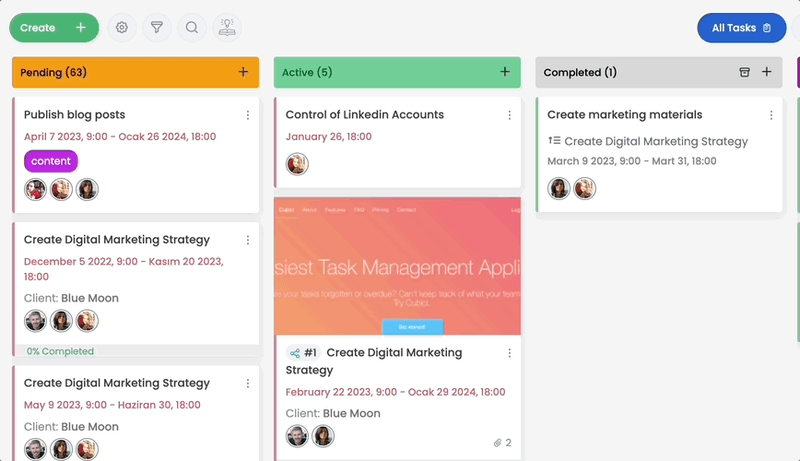
One Workspace, Fewer Places to Look
Cubicl brings together the core tools distributed teams need to stay organized:
- Visual Task Management: Kanban boards, Gantt charts, subtasks, and dependencies
- Integrated CRM: Client pipelines, deal tracking, and contact management
- Client Portal: Secure external access, file sharing, and task visibility
- Built-in Collaboration: Task comments, activity feeds, and team chats
- Time Tracking & Reporting: Task timers, activity logs, and performance reports
The real advantage isn't simply having all these features. It's having them connected.
Because when your client information knows which project it belongs to, your project knows which tasks need to be completed, and your tasks know how much time they're taking, suddenly the work starts to make a little more sense.
And isn't that what good software is supposed to do?
Streamlined Task Assignment and Dependency Management
Remote teams don't have the luxury of leaning over a desk and asking, “Is this ready yet?”
Cubicl replaces that hallway conversation with a clearer workflow.
Project managers can create and assign tasks, organize projects into manageable task lists, set start and due dates, and attach the documents team members need to get the job done. More importantly, sub-steps and sub-tasks make the relationship between different pieces of work visible.
Imagine a copywriter finishes a content draft. Instead of sending a message to the designer saying, “It's ready,” the workflow itself can make the next step clear. The designer knows when their task can begin, while the project manager doesn't have to act as a human notification system.
It's a small change, perhaps. But multiply that across dozens of tasks and several time zones, and those small changes start saving a significant amount of time.
When Your CRM and Projects Actually Talk to Each Other
Here's another familiar workplace story.
Sales has the client information. The project team has the deliverables. Customer support has the latest request. And somewhere in between them sits an email thread containing the one detail everyone needs.
Sound familiar?
Cubicl brings CRM and project management into the same environment, allowing teams to connect client relationships with the actual work being performed.
Client requests can become actionable tasks, those tasks can be assigned to the appropriate team members, and project progress can be tracked alongside the relevant client information. Instead of moving information from one system to another, teams can manage the relationship and the work from the same place.
Then there's the Client Portal.

Rather than sending another weekly email explaining what has been completed, clients can access relevant project information, share files, and provide feedback through a dedicated space. Your team spends less time preparing status updates, while clients get greater visibility into what's happening.
It's a better arrangement for everyone. And perhaps most importantly, it replaces “Just checking in…” emails with something much more useful: visibility.
Time Tracking Without the Spreadsheet Headache
For agencies, consultants, and service-based businesses, time isn't just something you manage. It's something you bill, estimate, analyze, and ultimately learn from.
Cubicl makes time tracking part of the workflow rather than another administrative task.
Team members can start a timer directly from a task or manually record the time they've spent. Because those entries are connected to specific tasks and projects, managers can see where time is actually going.
That information can answer some surprisingly important questions:
Which projects are taking longer than expected?
Which tasks consistently consume more resources?
Where are the bottlenecks?
And perhaps the most uncomfortable question of all: Why did we think this would take three hours?
With detailed time reports, managers can use real project data to improve estimates, understand resource allocation, and make better decisions about future workloads.
Work Doesn't Stop When You Leave Your Desk
Remote work was supposed to give us freedom. It would be a little ironic if the software we use to manage that freedom only worked well when we were sitting at our desks.
Cubicl's visual task management gives teams multiple ways to understand their work, including list views, Kanban boards, and Gantt Charts. Different teams can work in the format that makes the most sense for them.
A creative team might prefer moving tasks across a Kanban board. A project manager overseeing a six-month implementation might care more about timelines, dependencies, and deadlines. The information stays connected; the way you look at it can change.
And because Cubicl is available on mobile as well as the web, remote employees can stay connected when they're away from their primary workstation. They can check task status, review updates, and receive notifications without needing to return to their laptop every time something changes.
Because when your team can work from almost anywhere, shouldn't your project management system be able to keep up?
The Bigger Picture
The best remote team management tools don't simply add more features to your workflow. They remove friction from it.
Cubicl brings the essential pieces of distributed work; tasks, projects, clients, communication, time, and reporting into a connected workspace. Instead of forcing teams to constantly switch between systems, it gives them one place to understand what needs to happen, who needs to do it, and where things stand.
And in a workplace where nobody necessarily shares the same office, the same schedule, or even the same time zone, that clarity isn't just convenient.
It's the infrastructure that keeps everyone moving in the same direction.
Comparing Task Management Tools for Remote Team Management
Choosing software for a remote team can feel a little like choosing an apartment in a new city. One has the perfect location. Another has the space. A third has the amenities but suddenly you're paying for a rooftop pool you never asked for.
Project management software works much the same way.
Jira, Monday, Trello, and Cubicl can all help teams organize work, but they are designed around different priorities. The question isn't which platform has the longest feature list. It's which one fits the way your team actually works.
Here's how they compare:
| Feature / Capability | Cubicl | Jira | Monday | Trello |
|---|---|---|---|---|
| Primary Focus | Unified Task Management & Built-in CRM | Software Development & Bug Tracking | Customizable Work Management | Lightweight Visual Kanban |
| Target Audience | Small to Mid-Sized Distributed Teams & Agencies | Engineering & IT Teams | Teams with Complex Workflows | Individuals & Small Project Teams |
| Integrated CRM | Included natively | Requires third-party apps | Available on higher tiers | Requires third-party power-ups |
| Client Portal | Native client access | Requires additional setup | Guest access available | Limited guest access |
| Time Tracking | Native task-level tracking | Typically requires an app/plugin | Available on selected plans | Requires third-party power-ups |
| Ease of Adoption | High | Moderate to Low | Moderate | High |
Jira: Powerful Project Management Tool, But Is It Too Much?
Jira is a natural choice for software development teams. Its strength lies in handling technical workflows, issue tracking, development processes, and complex engineering projects.
But what happens when the people using your project management software aren't developers?
For marketing, operations, consulting, or creative teams, Jira can feel like bringing a toolbox to a dinner party. There are plenty of useful tools inside, but you may spend more time figuring out which ones you need than actually using them.
For teams that need sophisticated development workflows that complexity can be an advantage. For everyone else, it may simply create a steeper learning curve.
Trello: Great for Simple Task Tracking
Trello gets one thing very right: simplicity.
Its visual Kanban boards make it easy to understand what needs to be done, what's in progress, and what's finished. For individuals and small teams managing relatively straightforward projects, that can be more than enough.
But projects have a habit of becoming complicated.
Add task dependencies, detailed time tracking, client management, reporting, and more complex workflows, and a simple board can start requiring a growing collection of Power-Ups and integrations.
At some point, you have to ask: Are you still using a simple project management tool, or are you slowly building one yourself?
Monday: Flexibility Comes With a Price
Monday takes a different approach. Its strength is flexibility, giving teams considerable freedom to customize workflows and structure their work.
That flexibility can be valuable for organizations with complex processes and specific operational requirements. But customization also introduces another question: How much setup does your team really want to do?
For smaller teams and growing businesses, a platform with extensive configuration options can sometimes become another project to manage. Pricing and plan limitations can also become more important as teams grow and require additional capabilities.
Cubicl: The Best Task Management Software for Remote Teams
And then there's Cubicl.
Rather than focusing exclusively on software development, lightweight Kanban boards, or highly customized enterprise workflows, Cubicl brings together the capabilities many growing teams need in a single workspace.
- Task management
- Multiple project planning
- Team collaboration
- CRM
- Client collaboration
- Time management
- Reporting
The advantage isn't that Cubicl necessarily tries to do everything. It's that the features work together around the everyday reality of managing a team.
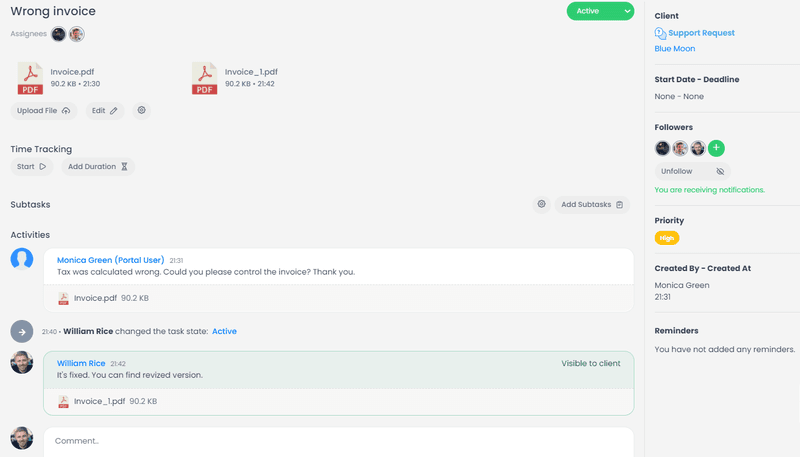
A project manager can assign tasks and track project status. A sales or account team can manage client information and related projects and tasks. A client can access relevant project updates. Teams use time tracker to record spent time. And everyone can work from the same underlying information.
For a growing company, that balance matters.
You don't necessarily need the most powerful tool on the market. You need a tool powerful enough to handle your work without making managing the tool part of the work.
And perhaps that's the real sweet spot for remote team management: enough functionality to keep your team organized, without so much complexity that organization becomes a full-time job.
Implementing the Best Task Management Software for Remote Teams
Remote work gave us freedom.
We can work from a home office, a coworking space, a café across townor, if the Wi-Fi cooperates, somewhere on the other side of the world. But with that freedom came a new question: How do you keep everyone moving in the same direction when nobody is in the same room?
The answer isn't another spreadsheet. It isn't another endless email thread. And it probably isn't another video call that could have been a task with a deadline.
Distributed teams need a shared digital workspace where everyone can see what needs to happen, who is responsible for it, when it's due, and what happens next.
That's what makes choosing the best task management software for remote teams less about finding the platform with the longest list of features and more about finding the right balance of power, flexibility, and simplicity.
Cubicl brings task management, project planning, team collaboration, CRM, client communication, and time tracking together in one connected platform. Instead of scattering information across multiple applications, teams can manage the work and the relationships behind that work, from a single place.
The result is less administrative friction, clearer accountability, better client visibility, and more time spent actually doing the work.
Because perhaps the biggest challenge of remote work was never the distance.
It was everything that got lost between us.
And sometimes, the best technology isn't the one that adds more to your workflow. It's the one that quietly brings everything back together.