
You assign a critical project phase to your lead developer. Two days later, you realize they haven't started because a dependent design asset is still pending. The designer thought they had until Friday. Your developer is now idle. Your project timeline just slipped by 48 hours. This structural disconnect happens when teams rely on static to-do lists instead of dynamic Task Scheduling Software. Managing multiple projects requires more than just knowing what needs to be done. You need absolute control over when work starts, how long it takes, and who handles it next.

Moving Beyond the Basic Task Manager
Many teams build their initial operations using tools like Todoist or basic spreadsheets. These tools track personal chores perfectly. They fail completely when you need to coordinate software development cycles or complex client deliverables. A basic task manager tells you a job exists. Task Scheduling Software dictates the operational rhythm of your entire workspace. It aligns team collaboration with strict project planning.
If your current project management platform lacks native time tracking or fails to display overlapping start dates, your team is flying blind. You end up guessing workload capacity. Evaluating the right management solution in 2026 means looking for a system built around granular control and visibility. This brings us to Cubicl.
Introducing Cubicl as Your Task Scheduling Software
Cubicl centralizes your workflow by combining task creation, client management, and team collaboration into a single project management tool. Users migrating from Asana or Zoho Projects often seek out Cubicl to consolidate disjointed apps into one coherent management system.
The platform approaches project work through highly customizable task records. You can create a task directly within a project using the Create button, or you can import a massive backlog from an Excel file.
Comprehensive Task Assignment and Control
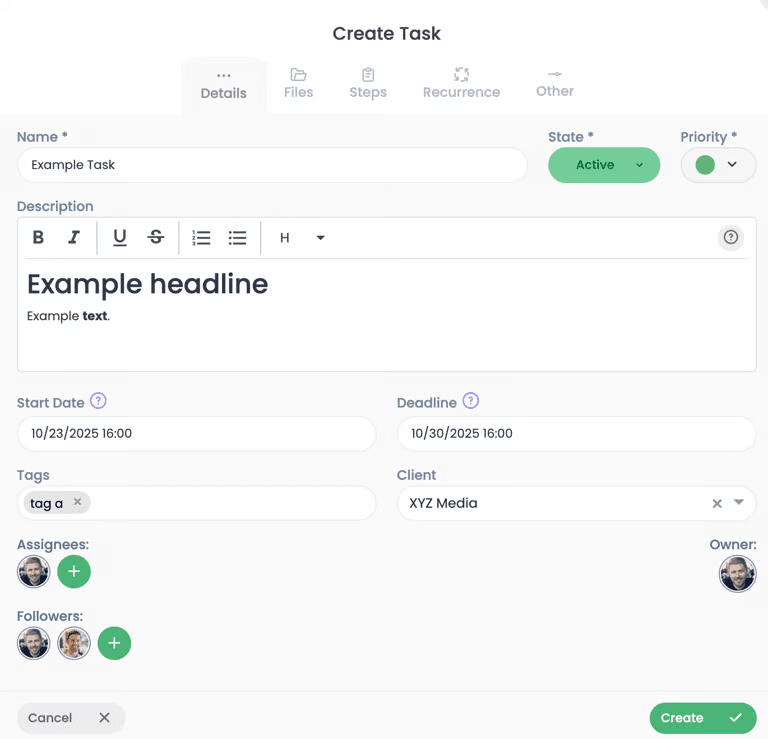
Effective task scheduling relies on precise data inputs. When you open the task creation form in Cubicl Task Management Software, you dictate every variable of the assignment.
- Priority Levels: Tasks default to a standard priority, but you can adjust this across five distinct categories ranging from Very High to Very Low. This priority system automatically orders tasks that lack a specific deadline.
- Date Management: Task Scheduling Software must handle timeframes, not just due dates. Cubicl offers both Start Date and Deadline fields. Entering both dates allows project managers to view assignee schedules and identify busy days instantly.
- Estimated Time: You can activate an Estimated Time field via project settings to forecast task duration before work begins.
- Client Association: You can link a task directly to an existing client or create a new client record straight from the task creation form.
- Custom Fields: Teams handle vastly different data types. You can attach short text, long text, numbers, dates, and option lists directly to your task forms.
- Assignees: You can assign tasks to project members or invite non-project members to collaborate across different departments.
Structuring Complex Projects: Substeps, Subtasks, and Workflows
A major challenge in any task management tool is scope definition. Make a task too broad, and it lingers for weeks without visible progress. Make it too narrow, and you drown in micro-tasks. Cubicl solves this by offering three distinct methods to break down project work.
Understanding the difference between these three elements ensures you choose the right structure for the job.
| Feature | Primary Purpose | Activity Log | Assignees | Deadlines |
|---|---|---|---|---|
| Substep | Creating a simple checklist or breaking down minor steps for a task. | No separate log. Activities stay on the main task. | Yes. | No. |
| Subtask | Dividing a massive piece of work into distinct, manageable tasks. | Yes, acts as a normal task with its own history. | Yes. | Yes. |
| Workflow | Applying a repeatable template of stages to similar tasks. | Yes, workflow stages become subtasks upon creation. | Yes. | Yes. |
For highly repetitive processes, you apply a Workflow template. For a basic list of requirements, you use Substeps. As team members complete substeps, they simply tick the box next to the item. If a substep suddenly requires more extensive work, you can convert it into a full task with a single click.
Features of Task Scheduling Software That Drive Productivity
Tracking software only works if your team actually uses it. Cubicl removes friction from daily operations through automation, clear visibility, and seamless communication.
Automating the Routine with Recurring Tasks
Manual task creation wastes billable hours. Cubicl handles repetitive project work through robust recurring task settings. You can configure a task to repeat on a daily, weekly, or monthly basis. For weekly tasks, the system allows you to select multiple specific days.
The work management software offers strict repetition conditions to match your specific workflow logic:
- Generate a new task after the current deadline passes, regardless of whether the active task is completed.
- Wait until the current task is officially completed before generating the next copy. This delay prevents a backlog of overdue recurring tasks.
- Generate a new copy exactly when the start date of the current task arrives.
You can set these loops to repeat indefinitely, stop on a specific calendar date, or end after a set number of occurrences. If your recurring task contains subtasks, a single toggle ensures those subtasks duplicate alongside the main parent task.
Visualizing Workload and Time
A list view works perfectly for straightforward daily execution, but agile teams often need more dynamic project views. Cubicl allows you to shift instantly from a standard list view into interactive kanban boards. Kanban boards give your team a highly visual representation of workflow stages, allowing you to track progress as assignments move from pending to active to completed in real time.
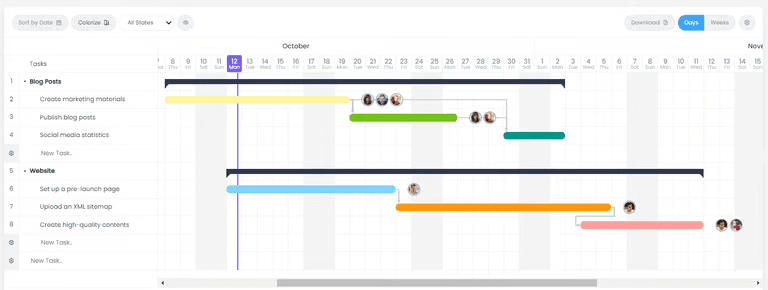
Long-term planning requires visual timelines. By selecting the "Add to Gantt" option, your task populates directly onto the project's Gantt chart. Gantt charts centralize your timeline data, making it easy to spot schedule conflicts and balance workload before bottlenecks delay your delivery date.
Many platforms force you to integrate third-party apps to track billable hours. Cubicl embeds a native time tracking feature directly on the task details page. A user simply clicks a button to start recording their time spent on tasks. This data feeds directly into project reports, allowing management to compare the initial estimated time against actual logged hours.
Leveraging AI for Task Summaries
Reviewing a task with fifty comments and a dozen file attachments drains productivity. Cubicl includes a built-in AI tool to summarize complex tasks instantly. The AI scans the task name, description, step completion status, state changes, and all activity logs to generate a concise briefing.
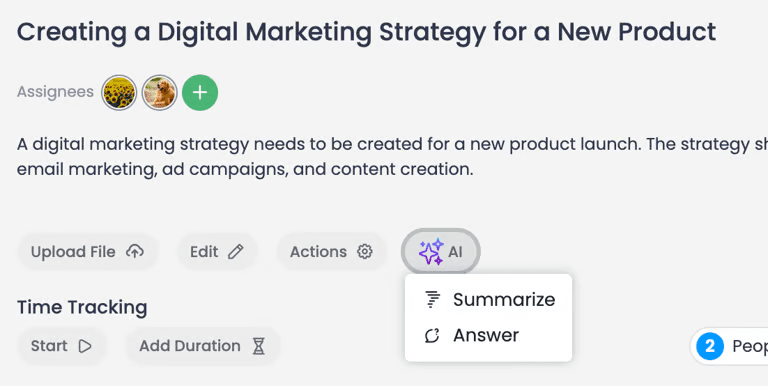
You can also interact with the AI in a dedicated chat window. You ask questions about the task history and receive immediate, context-aware answers. If you ask a question completely unrelated to the task, the AI prompts you to adjust your query. To protect client data and privacy, this summarization feature requires explicit user consent, and administrators can disable the AI functionality entirely across the organization. Summarization is automatically disabled for email-based tasks to protect external communications.
Navigating the Task Details Page
Once you create a task, Cubicl directs you to the Task Details page. This interface splits into two highly functional columns to organize your data. The left side houses the core execution elements: the task description, attached files, hierarchical steps, subtasks, the time tracker, and the ongoing activity log. The right column displays administrative metadata: client information, start dates, deadlines, customized tags, followers, priority levels, and any custom fields you built.
This layout ensures that the person executing the work focuses on the left column, while the project manager tracking the schedule monitors the right column.
Centralized Document Management
Work execution requires assets. Task management platforms must centralize these assets to prevent version control chaos. Cubicl allows you to attach files directly from your local computer, via a direct URL, or through integrations with Google Drive and Dropbox. Adding files from Google Drive requires a simple, one-time permission authorization.
These attached files appear directly at the top of the task details page and inside the activity log if attached to a specific user comment. If a user deletes their specific activity log comment, the system automatically deletes the attached file to maintain data hygiene. Files attached to a specific task do not populate in the broader project-level files page, keeping the main project directory uncluttered. Be aware that if you utilize recurring tasks, attached files do not automatically duplicate to the newly generated recurring copies.
Collaboration, Communication, and Client Portals
Effective Task Scheduling Software must bridge the gap between internal team collaboration and external client communication.
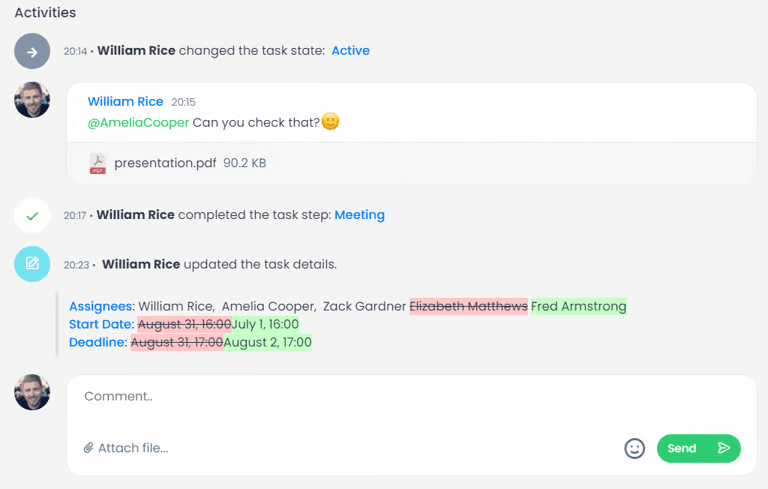
Inside Cubicl, every task acts as a focused communication hub. Team members can write posts in the activity log, tag specific assignees using the "@" symbol, or alert all assignees at once using "#Assignees". If you spot a typo or upload the wrong file, you have a five-minute window to edit or delete your post. Users can also react to these posts with emojis to acknowledge updates rapidly without cluttering the thread with text.
Sometimes typing takes too long. Cubicl allows users to record and attach voice messages up to two minutes long directly within task activities. Team members can preview these audio files directly in the browser without downloading them, speeding up complex technical explanations.
Client visibility is equally robust. You can share a specific task with a client by selecting "Share with client" from the actions menu. The client then logs into a dedicated Client Portal to track activities and monitor progress in real time. They only see the data you explicitly share, keeping your internal discussions secure while maintaining professional transparency.
Handling Bulk Operations and Automation
Transitioning to a new Task Scheduling Software often intimidates teams due to data migration. Cubicl handles this through a powerful bulk import feature. You can map out your existing task lists in a spreadsheet and upload them directly into the system. To ensure data integrity, you simply match your spreadsheet stage names to your Cubicl project stages and create any necessary tags beforehand. Testing a small batch of four or five tasks guarantees a smooth transition before migrating your entire database.
Beyond standard task lists, advanced teams require specialized data collection. Inside Cubicl, you can attach custom forms directly to a task via the actions menu. Forms streamline process workflows by forcing users to submit specific, structured data rather than dropping vague notes in the comments. You can use these forms to gather precise task-related information or conduct internal team surveys.
To further accelerate your operational rhythm, Cubicl supports Custom Actions. This feature allows workspace administrators to program personalized options directly into the task action menu. Instead of manually moving a task, sending a notification, and changing a tag, a custom action executes specific automations instantly.
Upgrading Your Task Scheduling Software
Your company cannot scale if project managers spend their days chasing status updates and manually copying recurring tasks. Task Scheduling Software transforms how a business operates. It forces clarity. Every assignment gets a start date, an estimated duration, and a clearly defined owner.
If your current setup relies on a fragmented mix of chat apps and static spreadsheets, your operational efficiency is suffering. You need a system that handles everything from granular subtasks to client-facing portals.
Stop guessing who is working on what. Take absolute control of your team workload and implement a proper management system. Sign up for a free plan or request a demo of Cubicl today to see exactly how structured scheduling accelerates your project delivery.